User Feedback
WorkflowAI allows you to collect feedback from users about your AI features.
Collecting end user feedback is essential for understanding how your AI features perform in real-world scenarios. The main goal is to gather insights about user satisfaction and feature effectiveness when users interact with your AI agents in production environments. This data helps you identify strengths and weaknesses, prioritize improvements, and measure the overall health of your AI-powered features over time.
Feedback loop
Add a feedback button to your product
Using our web SDK, or by using our API.
Users click the button and give feedback
Users provide their input on the AI feature's performance.
View feedback in the WorkflowAI dashboard
Your team can analyze all collected feedback in one place.
Improve instructions based on the feedback
Use the insights to refine your AI agent's instructions and performance.
How it works
Feedback Token Lifecycle
The feedback system operates through a secure feedback_token that links user feedback to specific AI interactions:
-
Token Generation: When you call the
/runendpoint to execute an AI agent, WorkflowAI automatically generates a uniquefeedback_tokenfor that specific interaction. -
Token Security: The
feedback_tokenis a cryptographically signed token that:- Is valid only for the specific run that generated it
- Cannot be used to access any sensitive data
- Requires no additional authentication to submit feedback
-
Token Propagation: Your application needs to pass this token from your backend to your frontend client application where feedback will be collected.
-
Feedback Submission: When a user provides feedback, your application sends the
feedback_tokenalong with the feedback data (positive/negative rating and optional comment) to WorkflowAI. -
Storage and Analysis: WorkflowAI associates the feedback with the original run, making it available in your dashboard for analysis.
The feedback_token is designed to be safely passed to client-side applications. It contains no sensitive information and can only be used for submitting feedback for the specific run that generated it. The token cannot be used to access any user data, modify your agents, or perform any administrative actions. This security-by-design approach allows you to freely incorporate feedback collection in your frontend without compromising your application's security.
User ID Tracking
- The optional
user_idparameter allows tracking feedback on a per-user basis - Each unique combination of (
feedback_token,user_id) can have only one feedback entry - Submitting new feedback with the same (
feedback_token,user_id) pair will overwrite previous feedback - This prevents duplicate feedback while allowing users to change their minds
Data Flow Diagram
Backend                              Frontend                             WorkflowAI
┌────────────┐                      ┌────────────┐                      ┌────────────┐
│            │  1. Call /run API    │            │                      │            │
│            │───────────────────────────────────────────────────────────>           │
│            │                      │            │                      │            │
│            │  2. Receive token    │            │                      │            │
│ Your       │<───────────────────────────────────────────────────────────           │
│ Server     │                      │ Your       │                      │ WorkflowAI │
│            │  3. Pass token       │ Client App │                      │ API        │
│            │───────────────────────>           │                      │            │
│            │                      │            │  4. Submit feedback  │            │
│            │                      │            │───────────────────────>           │
│            │                      │            │                      │            │
└────────────┘                      └────────────┘                      └────────────┘
Access feedback_token
feedback_token needs to be accessed from the client application that will be used to post feedback.
import workflowai

# Get feedback token from run
run = await my_agent.run(MyAgentInput())
print(run.feedback_token)

# Get feedback token when streaming
async for chunk in my_agent.stream(MyAgentInput()):
    # Process chunks
    pass
print(chunk.feedback_token)
import { WorkflowAI } from "@workflowai/workflowai";
const workflowAI = WorkflowAI();
// Get feedback token from run
const { output, feedbackToken } = await myAgentFunction(input);
console.log(feedbackToken);
// Get feedback token when streaming
let lastChunk: RunStreamEvent<OutputType> | undefined;
for await (const chunk of stream) {
lastChunk = chunk;
}
console.log(lastChunk?.feedbackToken);Agents API
The feedback token is returned by the run endpoint. See the endpoint documentation.
POST /v1/_/agents/my-agent/schemas/1/run
Host: https://run.workflowai.com
Authorization: Bearer {Add your API key here}
Content-Type: application/json

# JSON Body
{
   "task_input": ...
}

# Response
{
   "task_output": ...,
   "feedback_token": ...
}
Chat Completions API
The feedback token is also returned in the chat completions response. See the API Responses documentation for more details.
POST /v1/chat/completions
Host: https://run.workflowai.com
Authorization: Bearer {Add your API key here}
Content-Type: application/json

# JSON Body
{
   "model": "gpt-4o-mini",
   "messages": [...],
   "metadata": {"agent_id": "my-agent-name"}
}

# Response
{
  "choices": [
    {
      "feedback_token": "fb_..."
    }
  ],
  ...
}
res = client.chat.completions.create(
model="...",
messages=[...],
metadata={
"agent_id": "my-agent-name"
}
)
# The following will likely raise typing errors since
# the OpenAI response Pydantic models do not include the fields
print(f"Feedback token: {res.choices[0].feedback_token}")
duration = getattr(res.choices[0], 'duration_seconds', None)
cost = getattr(res.choices[0], 'cost_usd', None)const response = await openai.chat.completions.create({
model: "gpt-4o-mini",
messages: ...,
metadata: {"agent_id": "my-agent-name"}
})
// "@ts-expect-error - is needed here if using TypeScript since the OpenAI types
// do not include the fields
console.log(`Feedback token: ${response.choices[0].feedback_token}`)
const duration = response.choices[0]?.duration_seconds;
const cost = response.choices[0]?.cost_usd;
console.log(`Duration: ${duration !== undefined ? duration + ' seconds' : 'N/A'}`)
console.log(`Cost of the generation: $${cost !== undefined ? cost : 'N/A'}`)Post feedback
The web SDK is the simplest way to add a feedback button to your web app.
React
npm install @workflowai/reactimport { FeedbackButtons } from '@workflowai/react'
...
<FeedbackButtons feedbackToken={...} userID={...} className='...'/>
...import workflowai
await workflowai.send_feedback(feedback_token="...", outcome="positive", comment=..., user_id=...)import { WorkflowAI } from "@workflowai/workflowai";
const workflowAI = WorkflowAI()
await workflowAI.sendFeeback({feedback_token: "", outcome: "positive", comment: "...", userID: ""})Posting feedback is a single non authenticated API call with a feedback_token and outcome in the body.
See the full documentation.
POST /v1/feedback
Host: https://api.workflowai.com
Content-Type: application/json

{
  "feedback_token": "...", # the token as returned by the run endpoint
  "outcome": "positive", # "positive" | "negative"
  "comment": "...", # optional, the comment from the user
  "user_id": "..." # optional, if provided, feedback will be associated with a specific user. Posting feedback for the same `feedback_token` and `user_id` will overwrite the existing feedback.
}
View user feedback
Via the UI
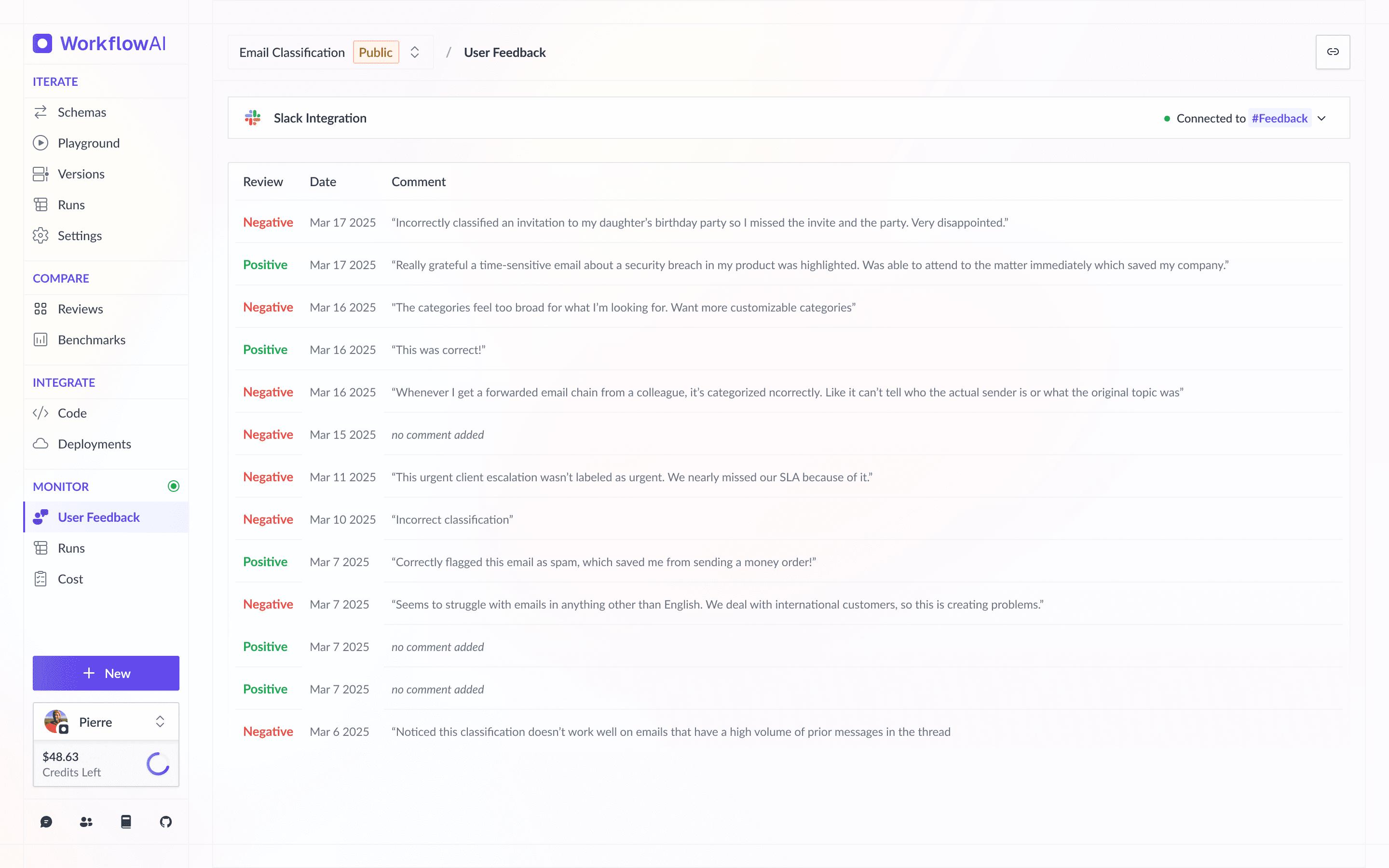
Go to the "User Feedbacks" section from the menu, and you'll see a list of feedback.
Via the API
[TODO: add API documentation]
Via MCP
[TODO: add MCP documentation]
How is this guide?